One of the most common questions we hear from field sales teams is a simple one: "I'm heading to Dallas next week — what carriers should I be talking to while I'm there?"
Until now, answering that question meant exporting a list, filtering by zip code, cross-referencing addresses, and doing a lot of manual work just to figure out who's nearby. It works, but it's slow — and it's easy to miss carriers that don't fit neatly into a zip code boundary.
Today, we're shipping a faster way.
What's New
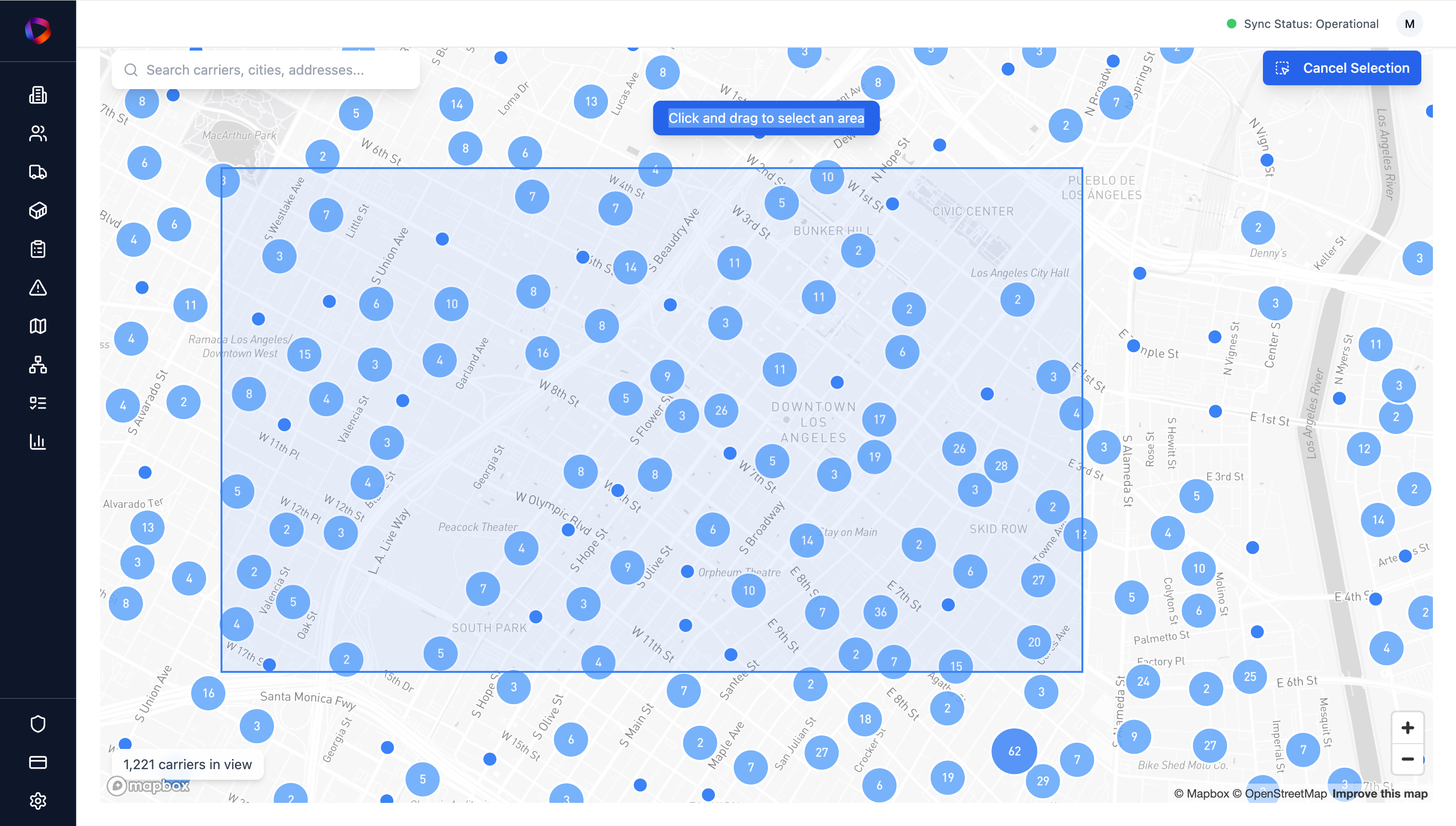
Map view is a new way to explore and prospect carriers in AlphaLoop. Instead of filtering through a table, you can now search and filter carriers visually on a map, see results plotted in real time, and draw a selection around any area to instantly build a list from what's on screen.
The core workflow is straightforward:
-
Apply filters — fleet size, equipment type, tech stack, geography, and more
-
See matching carriers plotted on the map in real time
-
Click "Select Area" and draw a box around any region
-
Instantly build a targeted list from the carriers in your selection
No spreadsheet. No zip code gymnastics. Just a map, your filters, and a list.
Who It's Built For
Map view is designed for teams that sell or market into carriers by region — particularly those doing any kind of field sales, territory planning, or event-based outreach.
A few of the use cases we had in mind:
-
Pre-trip prospecting. A rep heading to a city can pull a list of high-fit carriers within a specific area before they land — and add them to a sequence before the trip.
-
Territory planning. Visualize where your target carriers are concentrated, identify underserved areas, and plan coverage accordingly.
-
Account clustering. Find clusters of carriers that match a specific profile in a target region, and build a focused outreach list without any manual filtering.
-
Event and conference prep. Heading to a tradeshow? See which carriers are nearby and reach out before the event.
How to Get Started
Map view is available now in AlphaLoop. Log in and look for the map icon in the left navigation — it's live for all accounts.
If you'd like a walkthrough or have questions about how to use map view with your current filters and workflows, reach out to us at matt@runalphaloop.com. We're happy to help.