Every freight GTM conversation starts the same way: a LinkedIn profile, an inbound email, a carrier's website — and then six tabs of lookups to figure out who you're actually talking to.
Today we're closing those tabs. The AlphaLoops Chrome Extension puts the full carrier record on the page you're already looking at.
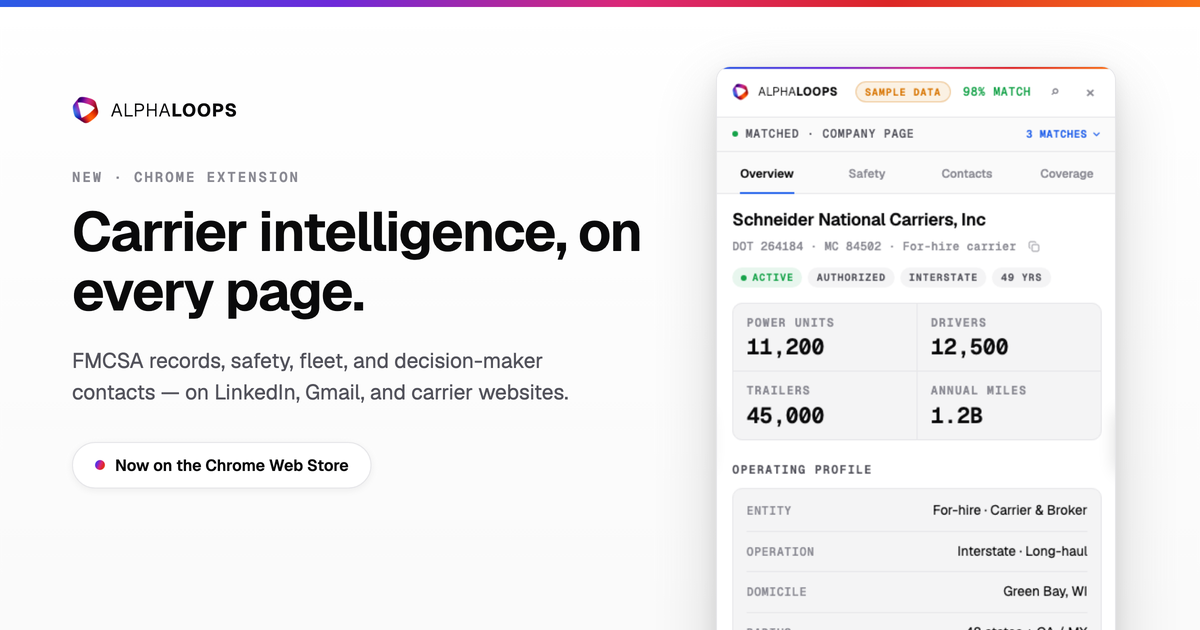
How it works. Open a carrier's LinkedIn page or an email from one of their people, and a side panel resolves the page to one of 2.7M carriers in the AlphaLoops graph — with a confidence score, and near-matches one click away if we got it wrong. On any other website, hit the toolbar icon to scan the page (or turn on automatic scanning in settings).
What's in the panel. Everything you'd open AlphaLoops for, in place: operating authority and DOT/MC identity · FMCSA safety — rating, out-of-service rates vs. national averages, violations, recent inspections · fleet size and composition by truck make and trailer type · insurance on file with policy history · headquarters with local time · and the carrier's decision-makers, with verified emails and direct dials unlocked using the same plan credits as the app — never billed twice, and unlocks sync both ways.
One click to your CRM. Push the carrier to Salesforce as an Account using your existing AlphaLoops integration — same match rules, same field mappings.
Try it before you sign in. The extension ships with a labeled sample-data mode: install it, visit Schneider National's LinkedIn page, and click around before connecting your account.
Private by design. Signed out, nothing leaves your browser. Signed in, we send only the minimum identifier needed to match a carrier — a domain or company name — never page content, titles, email bodies, or browsing history. Full details in our Chrome Extension Privacy Policy (/chrome-extension-privacy).
Install from the Chrome Web Store → Free with every AlphaLoops account.