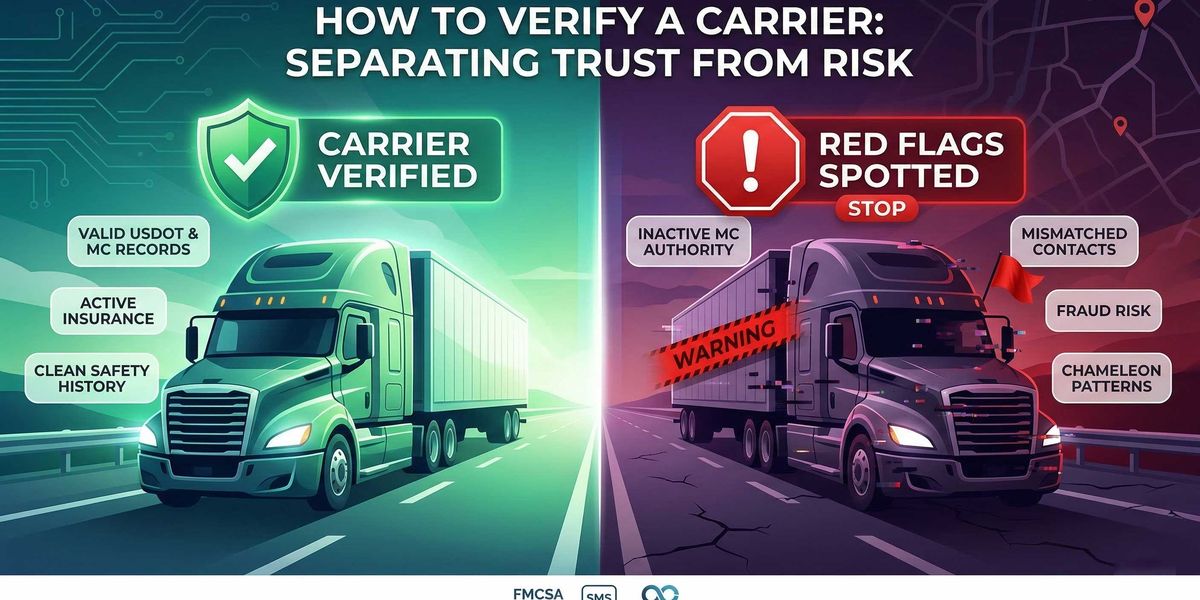
To verify a carrier, check that its USDOT and MC information match the company you are dealing with, confirm active operating authority and insurance, review safety and inspection history, and look for fraud red flags such as mismatched contact information, recent name changes, or newly issued authority. FMCSA data is the starting point, not the full answer.
Verifying a carrier means more than checking whether a USDOT number exists. A proper carrier verification workflow should confirm the company's identity, active authority, insurance, and safety history — and also catch fraud red flags like mismatched contact information or suspicious profile changes. FMCSA provides the core public systems for this, including SAFER, SMS, and Licensing & Insurance, but users still have to piece the workflow together themselves.
What It Means to Verify a Carrier
Carrier verification is the process of confirming that a motor carrier is who they claim to be, that they are legally authorized to operate, that they carry adequate insurance, that their safety record is acceptable, and that the person you are communicating with is actually connected to that carrier.
That last point matters more than most people realize. A valid DOT number does not, by itself, verify that you are dealing with the legitimate carrier. Anyone can read a DOT number off the FMCSA website and claim to represent that company. The safest workflow is to match the DOT and MC records to the exact company, contact, and operating profile you are dealing with.
To verify a carrier, you need to confirm identity, authority, insurance, safety history, and contact consistency. Carrier verification should catch both compliance risk and impersonation risk.
Information You Need Before You Start
Before running through any verification workflow, collect as much of the following as you can from the carrier or their representative:
-
Legal company name (exactly as registered)
-
USDOT number
-
MC number (if operating as for-hire interstate)
-
Physical address
-
Phone number and email address
-
Name and title of the person you are dealing with
-
Insurance certificate or COI
The more information you collect upfront, the easier it is to cross-reference everything against official records. If a carrier or dispatcher is reluctant to provide basic identification details, that itself is worth noting.
Carrier Verification Checklist
Use this as a quick reference before tendering freight to any carrier. Each item is covered in detail in the step-by-step sections below.
-
Confirm the legal company name, USDOT number, and MC number
-
Check active operating authority
-
Verify insurance and process agent information
-
Review SAFER snapshot data
-
Review SMS safety data
-
Compare phone, email, domain, and dispatch contact details against the FMCSA record
-
Watch for newly issued authority or sudden profile changes
-
Check for mismatches, rebranding, or related entities
-
Look for crash, inspection, and out-of-service patterns
-
Document the verification before tendering freight
Step 1: Confirm the Carrier's Identity
Start with the basics. Match the company name, USDOT number, MC number, physical address, and phone number the carrier gave you against what FMCSA has on file. Any discrepancy here is a reason to dig deeper before proceeding.
Pay attention to exact name matching. A carrier that calls itself "ABC Logistics LLC" but whose FMCSA record shows "ABC Logistic LLC" or "ABC Logistics Inc" may be legitimate, or it may be someone impersonating a real carrier with a slightly different legal name. Verify that the entity name, address, and identifiers line up precisely.
If you are working with a dispatcher or freight broker who contacted you on behalf of the carrier, confirm that the dispatcher is actually authorized by the carrier. Call the phone number on the FMCSA record directly, not the number the dispatcher gave you.
Step 2: Check DOT and MC Records
FMCSA allows users to search by company name, USDOT number, or MC number. The Licensing & Insurance system is the place to look up interstate operating authority, insurance filings, and process agent information.
A DOT number lookup confirms whether the carrier is registered and provides the baseline profile: legal name, DBA, physical address, phone, operation type, cargo carried, and fleet size from the most recent MCS-150 filing. An MC number lookup confirms interstate for-hire operating authority specifically.
Check both. A carrier may have an active DOT number but inactive or revoked MC authority. If the carrier is claiming to operate as an interstate for-hire carrier but their MC authority is not active, that is an immediate disqualifier.
Step 3: Review SAFER Data
FMCSA's free Company Snapshot in the SAFER system provides a summary view of any registered carrier. The SAFER snapshot includes carrier identification, fleet size, cargo types, inspection summary with out-of-service rates, crash data, and safety rating if one has been assigned.
What to look for in a SAFER lookup:
-
Entity type and operation. Confirm whether the carrier operates as authorized for-hire, private, or exempt. This should match what they told you.
-
Fleet size. A carrier claiming to run 200 trucks but showing 3 power units in SAFER deserves scrutiny. Keep in mind that MCS-150 data can lag by up to 24 months, so small discrepancies are normal. Large ones are not.
-
Out-of-service rates. Compare the carrier's vehicle and driver OOS rates against the national average. Rates significantly above average indicate systemic maintenance or compliance problems.
-
Crash data. SAFER shows the number of reportable crashes in the past 24 months. A high crash count relative to fleet size and mileage is a warning sign.
-
Safety rating. If the carrier has been rated, it will show Satisfactory, Conditional, or Unsatisfactory. Not all carriers have been rated. The absence of a rating does not mean the carrier is unsafe, but it does mean less information is available.
SAFER is a useful starting point, but it is a snapshot. It tells you what is on file. It does not tell you whether the information is current or whether the person contacting you is actually connected to that carrier.
Step 4: Review SMS Safety Data
FMCSA's Safety Measurement System (SMS) uses roadside inspection data, crash reports from the last two years, and investigation data to identify higher-risk carriers. SMS organizes this information into seven Behavior Analysis and Safety Improvement Categories (BASICs): Unsafe Driving, Crash Indicator, Hours-of-Service Compliance, Vehicle Maintenance, Controlled Substances/Alcohol, Hazardous Materials Compliance, and Driver Fitness.
Each BASIC shows a percentile ranking. A higher percentile means a worse safety performance relative to peers. Carriers in the higher percentiles for multiple BASICs warrant extra scrutiny.
What SMS Adds Beyond SAFER
-
Trend visibility. SMS data is updated monthly with new inspections and crash reports, so it reflects recent performance more accurately than a static safety rating.
-
Inspection detail. You can see individual inspection records, including violation types, severity, and whether the vehicle or driver was placed out of service.
-
Peer comparison. The percentile rankings let you compare a carrier against others of similar size and type, which is more useful than looking at raw numbers in isolation.
Review SMS data for patterns. A carrier with one bad inspection is different from a carrier with a pattern of recurring HOS violations or vehicle maintenance failures. Patterns indicate systemic problems that are unlikely to resolve themselves.
Step 5: Verify Authority and Insurance
FMCSA's Licensing & Insurance system is the authoritative source for operating authority status, insurance filings, and process agent information.
Check for the following:
-
Authority status. The carrier should have active common or contract authority if operating as interstate for-hire. Inactive, revoked, or "not authorized" status means the carrier is not legally permitted to haul freight for compensation across state lines.
-
Insurance on file. Federal regulations require minimum insurance levels based on cargo type. Verify that the carrier's insurance filing is current and that the insurer and policy information are on file. An active authority with no insurance filing, or with expired insurance, is a serious red flag.
-
Process agent (BOC-3). Carriers must designate process agents in each state where they operate. A missing BOC-3 filing can indicate incomplete registration.
-
Authority effective date. A newly issued authority is not automatically disqualifying, but it deserves extra scrutiny. A carrier that received its authority last week and is already soliciting loads may be legitimate, or it may be a chameleon carrier operating under a freshly obtained MC number.
If a carrier provides a Certificate of Insurance (COI), cross-reference the insurer, policy number, and coverage amounts against what FMCSA shows. Mismatches between a COI and FMCSA insurance filings are a significant concern.
Step 6: Check for Fraud Red Flags
Carrier fraud in trucking takes several forms: identity theft (impersonating a real carrier), chameleon carriers (rebranding to escape enforcement), and double brokering (re-brokering loads without authorization). Verification guidance from industry sources consistently warns about several specific red flags.
Major Carrier Fraud Red Flags
-
Newly issued authority with no inspection history. A carrier that just received its MC number and has zero inspections or safety data is harder to verify. Legitimate new carriers exist, but this combination requires additional scrutiny.
-
Inactive or revoked authority followed by new authority at the same address. This is the classic chameleon carrier pattern. The old MC is shut down (voluntarily or by enforcement), and a new MC appears at the same physical location, often with similar officer names or shared phone numbers.
-
Frequent insurance changes. Carriers that switch insurers repeatedly in a short period may be having difficulty maintaining coverage, which can indicate financial instability or insurers dropping them for claims history.
-
Mismatched phone numbers, email domains, or company details. If the carrier's email domain does not match their company name, or the phone number they gave you does not match the FMCSA record, investigate further. Impersonation often breaks down at the contact detail level.
-
Recent name or ownership changes. FMCSA records show legal name history. A carrier that has changed names multiple times in a short window is worth investigating. Name changes are sometimes legitimate (mergers, acquisitions), but they are also used to distance a company from a bad reputation.
-
Unwillingness to provide documentation. Legitimate carriers expect to be vetted. A carrier or dispatcher who pushes back against providing basic documentation, or who pressures you to book immediately, is exhibiting behavior consistent with fraud.
-
Load board behavior. Carriers posting on load boards with rates significantly below market may be double brokering. If the rate seems too good, the carrier may not be planning to actually haul the freight.
If the records look clean but the identity trail looks wrong, stop and verify further. Fraudsters count on urgency and time pressure to get loads tendered before anyone checks too closely.
Step 7: Compare Records with the Real Contact
This is where the verification workflow either catches real risk or misses it entirely. Steps 1 through 6 confirm whether a legitimate carrier record exists. Step 7 confirms whether you are actually dealing with that carrier.
Basic public records can show whether a carrier exists. They do not always reveal whether the load is being tendered to the right party.
Compare everything the carrier or their representative gave you against the official records:
-
Does the phone number match the one on the FMCSA record? If not, call the number on file directly.
-
Does the email domain match the carrier's legal name or DBA? A carrier called "Smith Trucking" using a Gmail address is different from one using smith-trucking.com.
-
Does the physical address match? Does the address appear to be a real commercial location?
-
Does the contact person actually work for that company? A quick LinkedIn or web search can confirm or raise doubts.
-
Is the dispatch number consistent with previous interactions, or did it change recently?
The biggest practical risk in carrier verification is not "does this carrier exist?" It is "is the person contacting me actually connected to that carrier?" Identity theft in trucking often involves someone copying a legitimate carrier's DOT and MC numbers and then posing as that carrier to steal freight or payment. The FMCSA record will look clean because it belongs to a real carrier. The fraud is in the impersonation, not the record.
What Basic FMCSA Verification Misses
Public FMCSA systems can confirm that a carrier record exists and show important safety and authority details. But they were not designed to answer the questions that actually prevent fraud and reduce risk in a modern freight operation.
|
What Public FMCSA Data Shows |
What It Does Not Show |
|---|---|
|
Whether a carrier record exists with active authority |
Whether the person contacting you is actually connected to that carrier |
|
Insurance filing status and insurer name |
Insurance stability over time or frequency of insurer changes |
|
Safety scores and inspection results |
Whether safety patterns are improving or deteriorating |
|
A single phone number and address |
Whether the phone, email, or domain you received matches the real carrier |
|
Legal name and officer names on file |
Whether the carrier has entity relationships with other MC numbers (shared VINs, officers, addresses) |
|
Authority effective date |
Whether a newly issued authority is connected to a previously revoked one |
|
Crash and OOS data |
Risk signals from legal filings, social media, or financial indicators |
FMCSA data is the starting point for carrier verification, not the full answer. The gaps above are where impersonation, chameleon carriers, and double brokering risk live. Closing those gaps requires cross-referencing entity relationships, monitoring operational changes over time, and matching the contact you are dealing with to the actual carrier record.
AlphaLoop is the carrier intelligence platform built specifically for this problem. It combines FMCSA data with entity relationship mapping (connecting related MC numbers through shared VINs, officers, phone numbers, and addresses), risk signals from legal filings and social media, contact intelligence, and operational change monitoring. Instead of piecing together data from five different government systems, teams get a single enriched carrier profile that flags the risks public records miss.