Can You Prospect With FMCSA Data?
Yes. FMCSA data is one of the best starting points for carrier prospecting. It gives you a public registry of over 600,000 active motor carriers with identifiers, authority status, cargo types, and reported fleet size. You can use it to build an initial target account list for trucking sales prospecting.
But FMCSA data alone will not get you to a qualified prospect. The registry was built for regulatory compliance, not for B2B sales. It lacks decision-maker contacts, technology stack intelligence, accurate real-time fleet sizes, and buying signals. To prospect trucking companies effectively, you need to start with FMCSA and then enrich with data from other sources.
How to Prospect With FMCSA Data
Here is the step-by-step workflow for building a carrier prospect list from FMCSA data and turning it into qualified pipeline.
-
Start with active carriers only. Pull carriers with active operating authority from the SAFER system or Motor Carrier Census file. Exclude carriers with revoked, inactive, or pending authority. This gives you a clean baseline of real, operating motor carriers.
-
Filter by operation classification. Narrow by whether carriers operate as authorized for-hire, private, or exempt. Most B2B sales teams selling fleet technology, insurance, or services target for-hire carriers. Match the operation classification to your ICP.
-
Filter by geography. Use the physical address on file to target carriers in specific states, regions, or metro areas. This is one of the strongest filters FMCSA provides for building a territory-based prospect list.
-
Filter by cargo type. FMCSA records what each carrier hauls: general freight, refrigerated, hazmat, household goods, and other classifications. If your product or service is cargo-specific, this filter narrows your list significantly.
-
Use power units and driver counts as rough segmentation only. FMCSA fleet size data comes from the MCS-150 form, which can lag by up to 24 months. Use it as a directional filter, but do not treat it as accurate. A carrier showing 50 power units may have 200 today.
-
Exclude bad-fit carriers. Remove carriers with poor safety ratings, high out-of-service rates, or characteristics that disqualify them from your ICP. This keeps your list clean before you invest in enrichment.
-
Enrich with real contacts. FMCSA only gives you a generic compliance email and phone number. Layer in decision-maker contacts — fleet managers, VPs of operations, directors of safety, procurement leads — from third-party contact databases.
-
Prioritize by buying signals. Layer in technology stack data, authority changes, fleet size growth signals, and ELD or TMS provider switches to prioritize which carriers to contact first. Carriers showing active buying behavior should be at the top of your outreach list.
This workflow is how the best trucking sales teams use FMCSA data for prospecting. The first six steps can be done with FMCSA alone. Steps 7 and 8 require enrichment from external sources — and they are what separate a raw carrier list from a qualified prospect list.
What FMCSA Data Gives You for Prospecting
Credit where it is due. FMCSA maintains the most complete registry of motor carriers in the United States. The SAFER (Safety and Fitness Electronic Records) system and the Motor Carrier Census file together provide a baseline that no other source replicates. For building an initial carrier prospect list, FMCSA gives you a legitimate starting point.
-
DOT Number and MC Authority. The unique identifiers that confirm a carrier is a real, registered entity with operating authority. This is the foundation of any FMCSA carrier list.
-
Power Unit and Driver Counts. A rough fleet size indicator. The MCS-150 filing captures truck counts and number of drivers. Useful for segmentation, but can be outdated.
-
Cargo Types. What a carrier hauls: general freight, refrigerated, hazmat, household goods, and other classifications. Essential for cargo-specific carrier prospecting.
-
Operation Classification. Whether the carrier operates as an authorized for-hire carrier, private carrier, or exempt entity.
-
Authority Status. Active, inactive, or revoked. Includes common, contract, and broker authority types with effective dates.
-
Safety Rating and Inspection History. BASIC safety scores, out-of-service rates, crash data, and complaint records.
-
Physical Address and Phone. The address on file and a single phone number, typically the main office or compliance line.
These fields let you filter by geography, fleet size, cargo type, and operation classification to build a targeted FMCSA carrier list. For a team that needs to know "which carriers exist," FMCSA answers the question. The problem starts when you need to know anything beyond existence.
Best Ways to Use FMCSA Data for Sales Prospecting
FMCSA data is most valuable when used for what it was designed to do: identifying and filtering real motor carriers. Here are the best use cases for FMCSA prospecting.
-
Building an initial TAM of motor carriers. FMCSA gives you the most complete count of active carriers in the US. Use it to define your total addressable market of motor carriers by authority type and status.
-
Filtering carriers by geography. The physical address field lets you target specific states, regions, or metro areas. This is one of the most reliable fields in FMCSA for territory-based sales prospecting.
-
Segmenting by cargo type. If you sell into specific verticals — refrigerated, hazmat, household goods — FMCSA cargo type classifications let you narrow your list to carriers that haul what matters to your product.
-
Identifying active authorities. Authority status filtering removes carriers that are no longer operating. This is a basic but critical filter for keeping your prospect list clean.
-
Rough fleet-size segmentation. Power unit and driver counts from the MCS-150 let you segment by fleet size ranges. The data lags, but it is directionally useful for distinguishing owner-operators from mid-size fleets from enterprise carriers.
-
Confirming carrier identity. DOT numbers and MC authorities are the definitive identifiers for motor carriers. Use them to deduplicate records, validate leads, and link carrier data across systems.
For these use cases, FMCSA is the best data source available. The problems start when sales teams try to use FMCSA for things it was never built to do.
What FMCSA Data Misses
This is where FMCSA prospecting breaks down. The registry was built to track compliance, not to help you sell. Every data point a sales rep actually needs to qualify and contact a carrier prospect lives outside FMCSA's databases.
Fleet Size Accuracy
The power unit count in FMCSA comes from the MCS-150 form, which carriers are required to update every two years or when information changes. In practice, many carriers only update at their biennial filing. That means fleet size data can lag by up to 24 months. A carrier that went from 50 trucks to 200 still shows 50. If your ICP is "fleets with 100+ power units," you are working with a structurally inaccurate list.
Decision-Maker Contacts
The only contact information in FMCSA is a single phone number and, in most cases, a generic safety@ or compliance@ email address. Every sales team, every lead gen vendor, and every marketing automation platform is already hitting that same email. It rarely reaches a buyer.
The people who actually buy fleet technology, insurance, fuel cards, and services are fleet managers, VPs of operations, directors of safety, and procurement leads. None of them are in FMCSA records. Finding trucking company contacts that reach actual decision-makers requires third-party contact intelligence layered on top of the carrier record.
Technology Stack
FMCSA has zero data on what ELD, TMS, GPS, telematics, or fuel card platform a carrier uses. For most vendors selling into fleets, technology stack is the single most important qualifying signal. Technology data lives in telematics provider databases, ELD inspection records, fuel card transaction data, and third-party intelligence sources. None of it exists in FMCSA.
Related Entities
A single trucking operation can hold multiple MC authorities. Four MC numbers sharing the same VINs, officers, physical address, and phone number look like four separate prospects in FMCSA's database. Without cross-entity analysis, sales teams call the same operator multiple times under different authority numbers.
Chameleon carriers compound this problem. These are operators who shut down one authority to escape enforcement actions and open a new one. FMCSA records show two unrelated entities. Only cross-referencing VINs, officer names, and addresses reveals the connection. AlphaLoop's Carrier Relationships feature maps these networks automatically, linking related MC numbers into a single operator view.
Buying Signals
When a motor carrier lists its MC authority for sale, switches ELD providers, adds power units, or changes ownership, those are buying signals that indicate a purchasing decision is underway. FMCSA does not flag any of these events. That information lives in broker marketplaces, authority transfer filings, telematics data, and carrier census changes that must be monitored separately.
What FMCSA Data Is Not Enough For
FMCSA data can tell you that a carrier exists. It cannot tell you whether that carrier is worth contacting, who to contact, or when to reach out. Here is what FMCSA data alone is not enough for.
-
Identifying decision-makers. FMCSA gives you a compliance email. You need fleet managers, ops directors, and procurement leads.
-
Confirming current fleet size. MCS-150 data can be up to 24 months old. You cannot segment by fleet size with confidence.
-
Knowing which ELD, TMS, or telematics tools a fleet uses. FMCSA tracks zero technology data. You need this for competitive intelligence and qualification.
-
Seeing related entities. Multi-authority operators look like separate carriers. Without entity mapping, you prospect duplicates.
-
Spotting authority sale signals. MC numbers listed for sale do not appear in FMCSA. You miss acquisition and transition opportunities.
-
Surfacing financial or fraud risk signals. FMCSA does not track payment history, double brokering indicators, or pending litigation.
This is not a criticism of FMCSA. The database does exactly what it was built to do: regulate motor carrier safety. The mistake is treating it as a sales prospecting tool when it is a regulatory compliance database.
How to Enrich FMCSA Data for Better Prospecting
The data that FMCSA misses exists — it just lives in different places. The challenge is assembling it into something usable. Here is where each piece of missing fleet prospecting data actually lives.
|
Prospecting Need |
Does FMCSA Provide It? |
Where to Get It |
|---|---|---|
|
Carrier identity |
Yes |
FMCSA / SAFER |
|
Reported fleet size |
Partially |
FMCSA, but can lag up to 24 months |
|
Decision-maker contacts |
No |
Third-party contact databases, LinkedIn |
|
Technology stack (ELD, TMS, GPS) |
No |
Telematics provider APIs, ELD inspection records |
|
Related entities |
No |
Cross-referencing VINs, officers, addresses across MC numbers |
|
Buying signals |
No |
Authority transfer filings, broker marketplaces, telematics data |
|
Financial and risk signals |
No |
Legal filings, payment network data, social media monitoring |
A sales rep trying to qualify a single carrier prospect might need to check FMCSA's SAFER system, search LinkedIn for the fleet manager's name, look up the carrier's ELD provider in inspection records, cross-reference the MC number against authority transfer listings, and then manually enter all of this into their CRM. That is the workflow for one prospect.
Multiply that by hundreds or thousands of carriers and the fragmentation becomes a structural bottleneck. The data is out there. Assembling it into something usable is the actual problem that fleet prospecting data platforms solve.
What a Complete Fleet Prospect Record Should Include
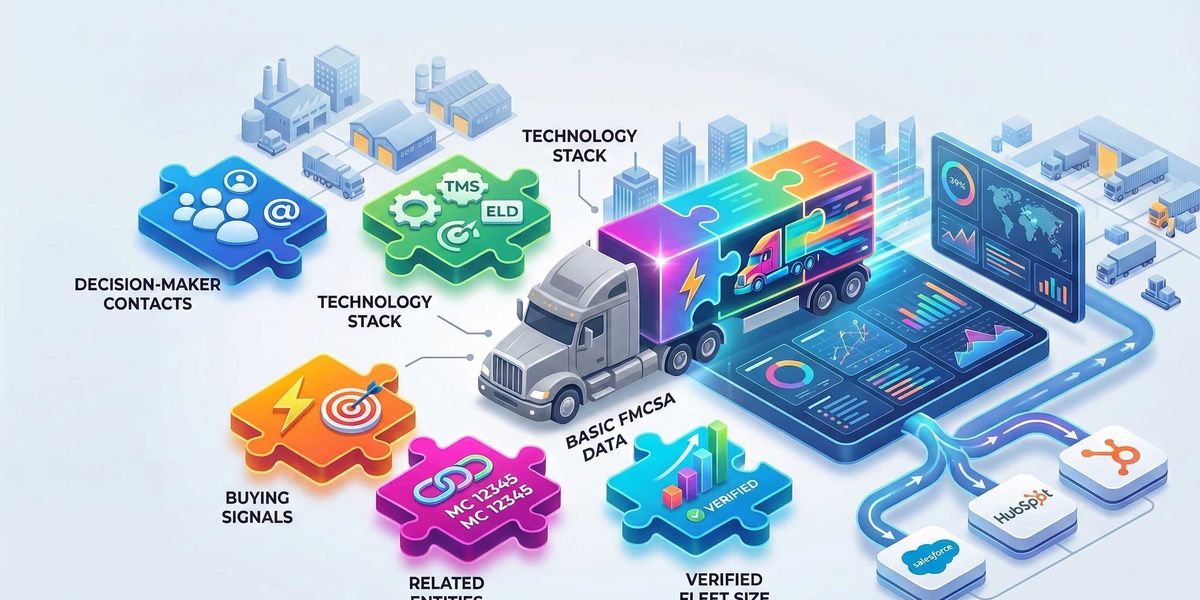
The solution is not more data sources. Sales teams already have too many tabs open. The solution is a single carrier record that combines everything a rep needs into one view. A complete fleet prospect record includes:
-
FMCSA identifiers: DOT number, MC authority, operation classification, authority status, and safety scores as the foundational layer.
-
Verified fleet size: Power unit counts validated against telematics data and insurance filings, not just biennial MCS-150 snapshots.
-
Decision-maker contacts: Named individuals with titles, verified emails, and direct phone numbers. Fleet managers, ops leads, safety directors, and procurement contacts.
-
Technology stack: Current ELD, TMS, GPS, telematics, and fuel card providers mapped to each carrier. Historical changes tracked for competitive intelligence.
-
Related entity network: All MC numbers, shell companies, and chameleon carrier connections linked to a single operator view.
-
Real-time buying signals: New authority grants, authority listings for sale, ownership changes, technology switches, fleet size changes, and insurance filing updates.
This record needs to live where reps already work. That means delivered into Salesforce or HubSpot, not in another standalone tool. And it needs to stay current. A carrier record that was accurate six months ago is not accurate today. Continuous enrichment is not optional.
AlphaLoop is the fleet intelligence platform that delivers this complete prospect record. It combines FMCSA data with telematics intelligence across 300+ providers, decision-maker contacts, technology stack detection, and related entity mapping into a single enriched carrier record, pushed directly into Salesforce and HubSpot.
Why FMCSA Data Alone Is Not Enough for Sales Prospecting
Data fragmentation is not an abstract problem. It shows up in pipeline metrics, conversion rates, and rep productivity in measurable ways. Teams that rely on FMCSA as their primary prospecting data source hit the same walls.
-
Manual research burns hours. Before a rep can decide if a carrier is worth calling, they are toggling between FMCSA, LinkedIn, Google, and their CRM. Even a disciplined researcher spends 10 to 15 minutes per carrier. At scale, that is entire days lost to tab-switching before any outreach happens.
-
Outreach lands on the wrong person. When the only email you have is safety@carrier.com, your message competes with regulatory notices, insurance renewals, and every other vendor using the same public FMCSA contact data. Response rates on generic FMCSA contacts are near zero for sales outreach.
-
Lookalike prospecting is impossible. Building a list of carriers that look like your best customers requires fleet size, technology stack, geography, cargo type, and growth trajectory. FMCSA gives you three of those six dimensions. Without the rest, lookalike modeling is guesswork.
-
Buying signals go undetected. A carrier switching ELD providers, acquiring a new authority, or listing an MC number for sale are all signals that a purchasing decision is underway. Fragmented data cannot surface these signals. By the time a rep notices, the deal is already in motion with a competitor.
-
CRM data decays without enrichment. Carrier records in Salesforce or HubSpot go stale within months. Authority status changes, contacts leave, fleet sizes shift, technology stacks get swapped. Without continuous enrichment, reps work from outdated information and waste outreach on dead leads.
The net effect is predictable. Longer sales cycles, lower connect rates, missed competitive signals, and a CRM full of records that no one trusts. Teams that rely on FMCSA alone for carrier prospecting are structurally disadvantaged against competitors who have solved the enrichment problem.